-
- APC Back UPS
- APC EASY UPS
- APC Modular UPS
- APC Smart SMC UPS
- APC Smart SMT UPS
- APC Smart SURT UPS
- APC SPM UPS
- APC Symmetra Power Module
- APC SYMMETRA LX
- APC Symmetra PX
- Eaton 5P UPS
- Eaton 5PX G2 UPS
- Eaton 93PR UPS
- Eaton 9PX Li-Ion UPS
- Eaton 9PX UPS
- Eaton 9SX Tower UPS
- Eaton DX RT UPS
- Eaton DX UPS
- Eaton Ellipse ECO UPS
- Eaton Marine UPS
- Eaton Power Module
- SANTAK UPS
- Schneider Galaxy 3L / EASY 3L UPS
- Schneider Galaxy VS UPS
- Schneider Galaxy VL UPS
- Vertiv UPS



-49%


Galaxy VS UPS 40kW 400V for up to 4 Internal 9Ah Smart Modular Battery Strings, Start-up 5x8 Galaxy UPS
Original price was: $13,999.00.$12,011.00Current price is: $12,011.00.

Galaxy VS UPS 40kW 400V for External Batteries, Start-up 5x8 Galaxy UPS
Original price was: $18,999.00.$11,958.00Current price is: $11,958.00.
APC Symmetra PX Intelligence Module – SYMIM16 APC UPS
Original price was: $1,499.00.$760.00Current price is: $760.00.
Description
| Overview Essential details | |||||||||||||||||||||||||||
| Warranty: | 2 Year | Place of Origin: | Philippine | ||||||||||||||||||||||||
| Brand Name: | APC-UPS | Model Number: | SYMIM16 | ||||||||||||||||||||||||
| Phase: | Three Phase | Protection: | Unbalanced Loads | ||||||||||||||||||||||||
| Type: | On-line | Application: | Computer/networking | ||||||||||||||||||||||||
| Packaging &delivery | |||||||||||||||||||||||||||
| Selling Units: Single item | |||||||||||||||||||||||||||
| Single package 17.3X45.2X70.5 cm size: | |||||||||||||||||||||||||||
| Single gross weight: 10.000 kg | |||||||||||||||||||||||||||
| Package Type: Package by strong kraft box. | |||||||||||||||||||||||||||
Picture Example:  |
|||||||||||||||||||||||||||
| Lead time? | Quantity(pieces) | 1-300 | >300 | ||||||||||||||||||||||||
| Lead time (days) | 7 | To be negotiated | |||||||||||||||||||||||||
| Specifications | |||||||||||||||||||||||||||
| Sctneider APC | |||||||||||||||||||||||||||
| Smart-UPS | |||||||||||||||||||||||||||
| SYMIM16 Symmetra PX | |||||||||||||||||||||||||||
| Sctneider A?C | |||||||||||||||||||||||||||
| SYMIM16 | |||||||||||||||||||||||||||
| Specification | |||||||||||||||||||||||||||
| item | value | ||||||||||||||||||||||||||
| Warranty | 2 Year | ||||||||||||||||||||||||||
| Place of Origin | Philippine | ||||||||||||||||||||||||||
| Brand Name | APC-UPS | ||||||||||||||||||||||||||
| Model Number | SYMIM16 | ||||||||||||||||||||||||||
| Phase | Three Phase | ||||||||||||||||||||||||||
| Protection | Unbalanced Loads | ||||||||||||||||||||||||||
| Type | On-line | ||||||||||||||||||||||||||
| Application | Computer/networking | ||||||||||||||||||||||||||
| color | Black | ||||||||||||||||||||||||||
     |
|||||||||||||||||||||||||||
| energy saving | Take-back | transparent | RoHS/REACh | ||||||||||||||||||||||||
| Consider your needs | |||||||||||||||||||||||||||
   |
|||||||||||||||||||||||||||
| Anti-power failure | Anti-surge | Voltage stabilization | |||||||||||||||||||||||||
 |
|||||||||||||||||||||||||||
| Anti-electronic Short circuit Overload | |||||||||||||||||||||||||||
| Turn off the UPS power supply | |||||||||||||||||||||||||||
| Turn off the AC mains power of UPS Turn off the UPS input circuit breaker | 220/230/240V 200/208V | ||||||||||||||||||||||||||
| Turn off the system enable switch. | system enable switch | ||||||||||||||||||||||||||
| Electrical connection | |||||||||||||||||||||||||||
| Danger | |||||||||||||||||||||||||||
| Electric shock danger ·Comply with all national and local electrical specifications. ·Wiring work must be completed by qualified electricians. ·Read and follow all safety and installation instructions in this manual ·Read and follow all safety and installation instructions in the manual cited in this manual Failure to comply with these instructions may lead to equipment damage,personal injury or death. | |||||||||||||||||||||||||||
| Symmetra LX | |||||||||||||||||||||||||||
| Please refer to the “Symmetra LX Electrical Installation Guide”for input and output power connections. | |||||||||||||||||||||||||||
| System installation checklist | |||||||||||||||||||||||||||
| Please refer to the “Symmetra LX Hardware Installation Guide”and “Symmetra LX Electrical Installation Guide”for detailed instructions | |||||||||||||||||||||||||||
| Disconnect all devices connected to the UPS. | |||||||||||||||||||||||||||
| Make sure that all rack mounting components are correctly fixed in the rack | |||||||||||||||||||||||||||
| Verify that the power supply module,battery module,and intelligent module are properly installed. | |||||||||||||||||||||||||||
| Verify that the Power View is connected to the smart module (IM). | |||||||||||||||||||||||||||
| Turn on UP SAC mains power supply. | |||||||||||||||||||||||||||
| Turn on input circuit breaker and system enable switch | system enable switch | ||||||||||||||||||||||||||
 |
|||||||||||||||||||||||||||
| 0 | 82001 | ||||||||||||||||||||||||||
| Ticking may be heard during initial startup. During initial startup,Power View may display diagnostic messages.These messages can be ignored Press Esc on the Power View until the monitoring screen is displayed. Confirm that the input voltage (Vin)matches the voltage of the branch circuit (main circuit) | |||||||||||||||||||||||||||
| System installation checklist (continued) | |||||||||||||||||||||||||||
| Turn on the maintenance bypass switch. | 208V 220/230/240V | ||||||||||||||||||||||||||
| lgnore any LED lights or diagnostic messages on the Power View Press Esc on the Power View until the monitoring screen is displayed. Confirm input voltage (Vin)matches the voltage of the branch circuit (main circuit). | |||||||||||||||||||||||||||
| Test the REPO switch. The system enable switch should be moved to the standby position and the system should be turned off. | |||||||||||||||||||||||||||
| Turn off input circuit breaker,system enable switch and maintenance bypass switch. | |||||||||||||||||||||||||||
| Open UPS (continued) | |||||||||||||||||||||||||||
| Turn on the UPS system enable switch | system enable Switch 0 | ||||||||||||||||||||||||||
| To start UPS without AC mains power supply,please press Hold any cold start button for four seconds. |  |
||||||||||||||||||||||||||
| Company Profile | |||||||||||||||||||||||||||
| MAIN PRODICTS | |||||||||||||||||||||||||||
Shipping & Delivery
Related products

-16%
APC Back UPS 1100VA with AVR 230V
In stock
Original price was: $169.00.$142.00Current price is: $142.00.
SKU:
BX1100CI-CN

-28%
APC Back-UPS, 650VA, AVR, 230V, APC UPS
In stock
Original price was: $149.00.$107.00Current price is: $107.00.
SKU:
BX650CI-CN

-30%
APC BK500M-CH APC Back UPS 500VA, 230V, APC UPS
In stock
Original price was: $99.00.$69.00Current price is: $69.00.
SKU:
BK500M-CH

-7%
APC Smart-UPS C, Line Interactive, 1000VA, Rackmount 2U, 230V, 4x IEC C13 outlets, USB and Serial communication, AVR, Graphic LCD APC UPS
APC & Schneider APC Smart SMC UPS Uninterruptible Power Supply (UPS) APC Smart SMC UPS APC UPS Hot Sell
In stock
Original price was: $599.00.$555.00Current price is: $555.00.
SKU:
SMC1000I2U-CH
-20%
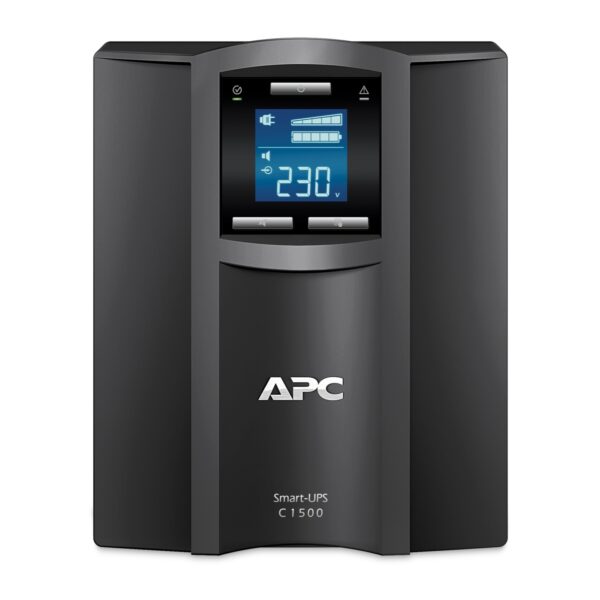
APC Smart-UPS C, Line Interactive, 1500VA, Tower, 230V, 8x IEC C13 outlets, USB and Serial communication, AVR, Graphic LCD APC UPS
APC & Schneider APC Smart SMC UPS Uninterruptible Power Supply (UPS) APC Smart SMC UPS APC UPS Hot Sell
In stock
Original price was: $469.00.$373.00Current price is: $373.00.
SKU:
SMC1500I-CH

-11%
APC Smart-UPS C, Line Interactive, 2000VA, Tower, 230V, 6x IEC C13+1x IEC C19 outlets, USB and Serial communication, AVR, Graphic LCD Smart UPS
In stock
Original price was: $759.00.$675.00Current price is: $675.00.
SKU:
SMC2000I-CH

-35%
APC Smart-UPS C, Line Interactive, 3kVA, Rackmount 2U, 230V, 8x IEC C13+1x IEC C19 outlets, USB and Serial communication, AVR, Graphic LCD APC UPS
Uninterruptible Power Supply (UPS) APC Smart SMC UPS APC & Schneider APC Smart SMC UPS APC UPS Hot Sell
In stock
Original price was: $1,299.00.$845.00Current price is: $845.00.
SKU:
SMC3000RMI2U-CH

-6%
APC Smart-UPS, Line Interactive, 500VA, Lithium-ion, Rackmount 1U, 230V, 4x IEC C13 outlets, SmartConnect Port, Short Depth
In stock
Original price was: $719.00.$673.00Current price is: $673.00.
SKU:
SCL500RMI1U